
Inbound Invoice Automation
Automatically read, match and post invoices using AI-powered technology. Reduce manual effort and accelerate your finance operations.

Inbound Invoice Automation
Automatically read, match and post invoices using AI-powered technology.
Inbound invoice automation enables invoices received from multiple channels to be analyzed using AI-powered data recognition and automatically transferred to the ERP system.
In traditional processes, invoices are manually reviewed, matched with purchase orders and goods receipts, assigned to accounting accounts, and recorded one by one. This approach leads to time loss and increases operational error risk.
With AI-driven automation, the system automatically reads the invoice, matches it with the related purchase order, performs amount and tax validations, and suggests or automatically assigns the appropriate accounting account. Users are involved only at the control and approval stage.
As a result:
- •Invoice data is automatically captured without manual entry.
- •Purchase order and goods receipt matching is performed using intelligent algorithms.
- •Tax rates and amount calculations are validated automatically.
- •Finance teams significantly reduce processing time.
Intelligent invoice automation reduces operational workload while strengthening financial control. The system continuously learns over time, achieving higher accuracy and efficiency.
How Does the Invoice Process Work?
The AI-powered automation system analyzes incoming invoices and manages the entire process automatically until ERP posting.
Invoice Received
Invoices are automatically transferred into the system from multiple channels such as e-Invoice, PDF, or Peppol.

AI Data Recognition
The AI engine analyzes invoice content and automatically identifies critical data fields.

Purchase Order Matching
The system automatically compares the invoice with the related purchase order and goods receipt.

Accounting Account Assigned
The defined rule engine and learning system suggest or automatically assign the appropriate GL account.

Posted to ERP
Approved invoices are automatically posted to the ERP system.
Finance teams intervene only in exceptional cases, ensuring a fast and controlled process.
Corporate Benefits of Inbound Invoice Automation
Enhance flexibility, control, and operational efficiency in your finance processes with an AI-powered infrastructure.
Flexible and Scalable Structure
The solution adapts to organizations of all sizes, from small businesses to large enterprises. It provides a scalable infrastructure that maintains performance even as transaction volumes grow.
Controlled Manual Intervention
Manual editing options are available for incomplete, inconsistent, or exceptional invoices. This ensures uninterrupted workflows while maintaining process control.
Full Traceability and Transparency
All steps, from invoice intake to ERP posting, are recorded. This simplifies audits and enables complete historical tracking.
Reduced Error Risk
Intelligent validation mechanisms minimize manual entry errors and ensure systematic verification during matching processes.
Operational Efficiency Improvement
Repetitive and time-consuming tasks are automated, reducing the workload of finance teams and allowing them to focus on higher-value activities.
Centralized E-Invoice and Document Management
All invoice channels are managed through a single platform. Standardized processes reduce operational complexity and enhance overall control.
How Are Exceptional Invoices Managed?
For invoices outside the automated flow, a controlled and flexible manual processing screen is provided.
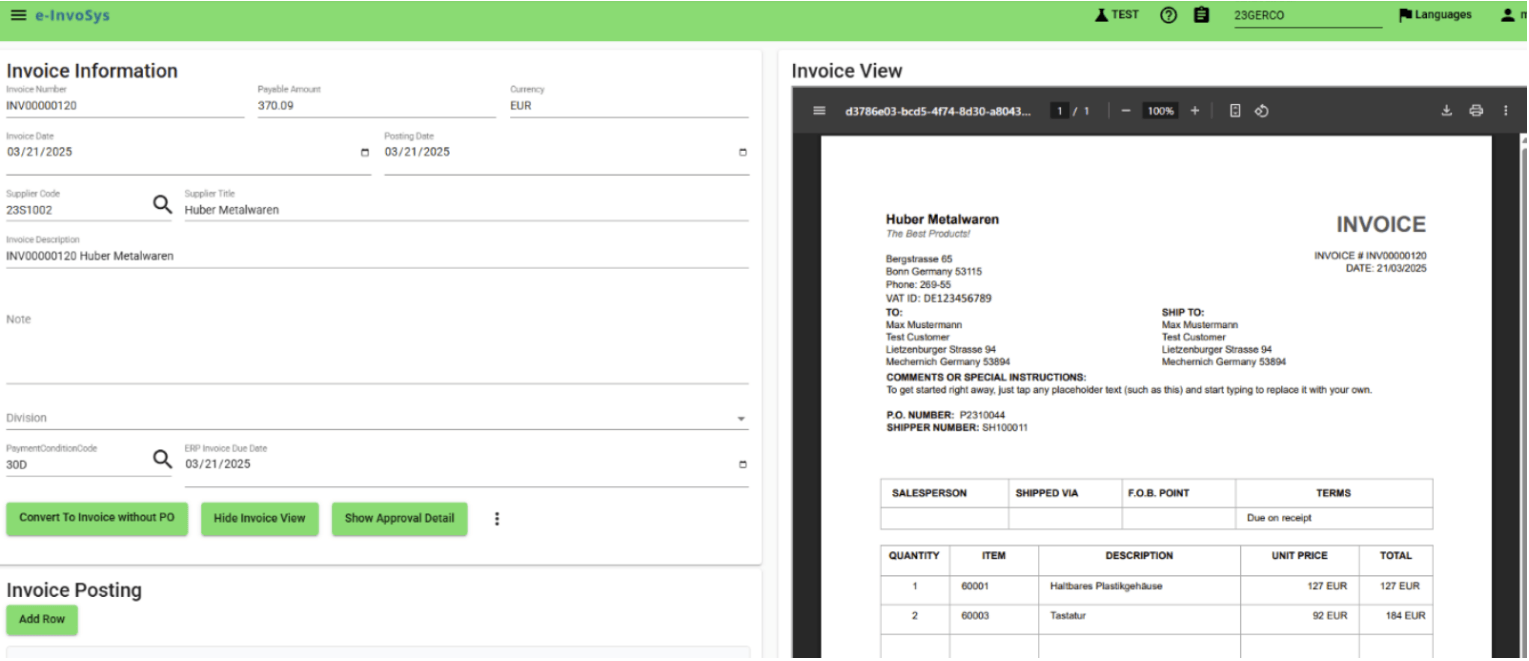
System Reads and Prepares the Invoice
The invoice PDF is automatically processed by the system. Fields such as invoice number, date, vendor, and amount are pre-filled, allowing users to focus on review and validation.
Visual and Data Side by Side
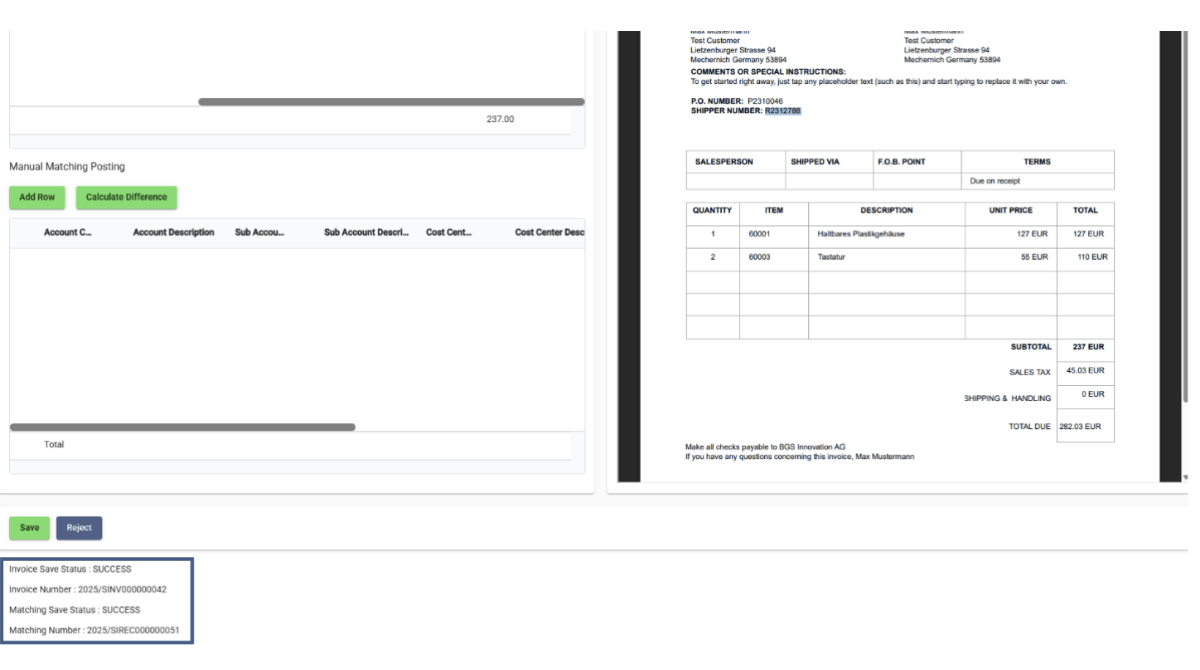
The invoice image and data fields are displayed simultaneously. Users can easily compare information and quickly detect potential discrepancies.
With or Without Purchase Order
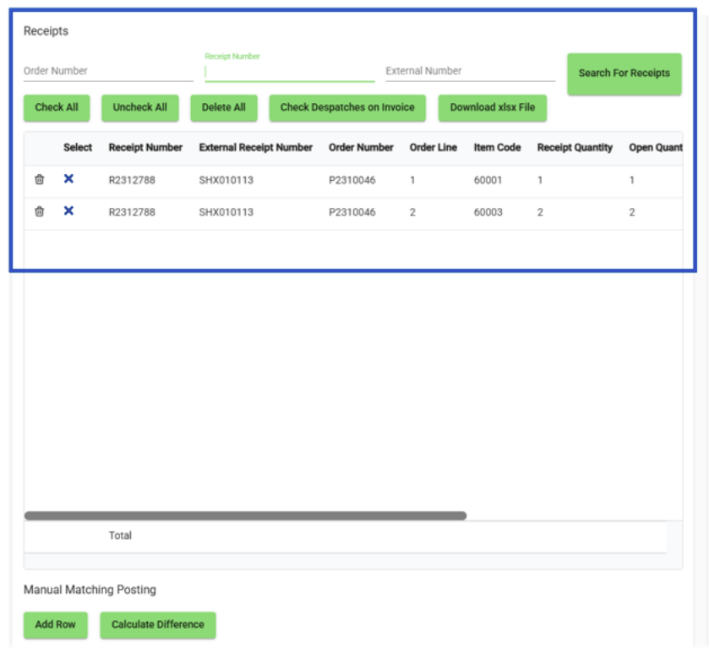
Invoices can be matched with existing purchase orders and goods receipts. For transactions without a purchase order, users can proceed directly with manual entry using the “Convert to Invoice without PO” option.


Ready to Automate Your Invoice Process?
Reduce manual workload, minimize errors, and accelerate your finance operations with AI-powered inbound invoice automation.
Contact us