
Inbound Despatch Entry Screen
View despatch notes within your ERP, link them to purchase orders, and securely complete goods receipt processes.

Inbound Despatch Entry Screen
View despatch notes via ERP, match them with purchase orders, and securely complete goods receipt processes.
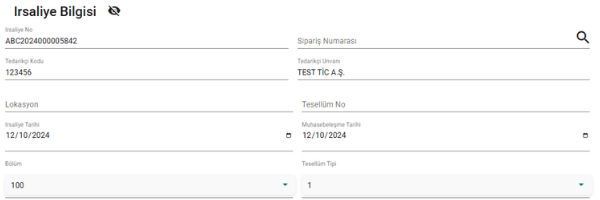
The Inbound Despatch Entry Screen enables users to view despatch notes and complete goods receipt transactions directly within the ERP system—without switching to integrator portals.
Users can simply enter the purchase order number to access the related despatch lines, perform necessary checks, and securely complete the goods receipt process.
With this structure:
- •Despatch information is centrally managed within the ERP.
- •Line-level control mechanisms prevent incorrect entries.
- •Relevant ERP transactions are automatically triggered based on the selected receipt type.
While operational efficiency increases, data accuracy and control mechanisms are maintained.
Goods Receipt Without Opening the Portal
Incoming despatch notes are displayed as PDF directly within the ERP screen. The user simply enters the purchase order number to automatically retrieve the related lines and initiate the goods receipt process.
Line-Level Control Mechanism
The system verifies purchase order and product codes. Matching lines are displayed in green, non-matching lines in red. If any incorrect line exists, the goods receipt button remains disabled.
| Line No | Feature Name | Vendor Product Code | Buyer Product Code | ERP Product Code | Purchase Order Number | Location | Match Status |
|---|---|---|---|---|---|---|---|
| 1 | 77mm Civata | 1234567 | A1234567 | A-1234567 | P00022 | 1000-01 | ✔ |
| 2 | 56 Pan Sol | 1234568 | A1234568 | A-1234568 | P00022 | 1000-01 | ✔ |
| 3 | 56 Pan Sağ | 1234569 | A1234569 | A-1234569 | P0022 | 1000-01 | ✖ |
Centralized Processing Within ERP
All transactions are managed on a single screen without portal dependency.
Automatic QAD Posting
Transactions are automatically executed based on the selected receipt type.
Prevention of Incorrect Entries
Data security is ensured through the line-level control mechanism.


Take Control of Your Inbound Despatch Entry Process
Discover how the despatch control mechanism operates directly within your ERP.
Contact us